Monday CRM is the only CRM I have seen a sales team build for itself in a week and then ask for an admin three months later. The first part is the pitch. The second part is the bill. Both are real, and which one matters more depends on how complex your sales process is and how long you plan to keep the person who built it.
I have set up monday CRM for a seven-person agency and a 30-person software team. The agency still uses it. The software team moved to HubSpot after two quarters, not because monday failed, but because the reporting and permission model became a part-time job. That split is a useful way to think about the product.
What monday CRM is
Monday.com started as a work operating system: boards, columns, automations, and dashboards that could be shaped into almost any workflow. Monday CRM is a product layer on top of that foundation, with pre-built boards for leads, contacts, deals, and activities. It looks like a CRM, it syncs email, it captures leads from forms, and it automates follow-ups. Underneath, it is still a board-based system, which is both the strength and the limitation.
The strength is speed. A sales leader can create a pipeline board, add stages, import contacts, and start working in a day. The limitation is that a board is not a data model. The more you need the system to behave like a CRM with relationships, permissions, forecasts, and reporting across objects, the more you find yourself building the data model by hand.
What it does well
The visual pipeline is excellent. Reps can see where a deal sits, drag it to the next stage, and update the owner without a training manual. The automations are approachable: when a lead fills out a form, create an item, assign an owner, and send a notification. A non-technical sales leader can build that in an afternoon. The integrations with Slack, Gmail, Outlook, Zoom, and Zapier cover the common stack. The mobile app is usable, and the price per seat is competitive for a small team.
Adoption is the underrated advantage. Monday CRM feels like a tool people already know, especially if the company uses monday.com for project management. Reps who resist a traditional CRM often accept a board because it looks like the tool they use to track their own work. That matters more than a feature comparison. A CRM that reps use beats a better CRM that they avoid.
Where it strains
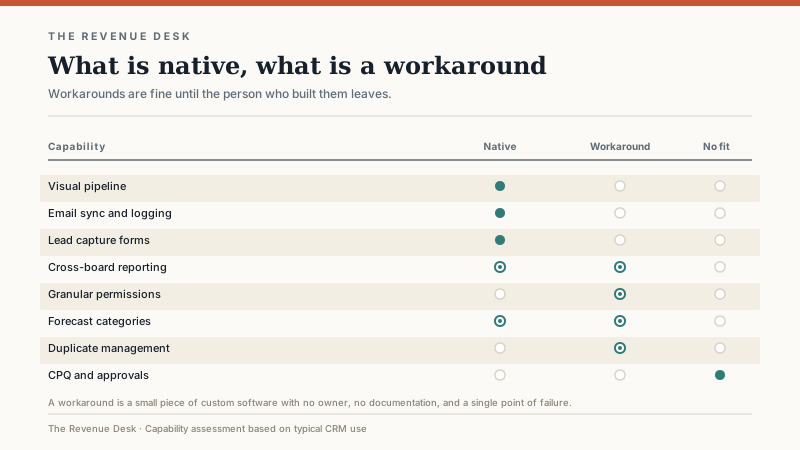
Board sprawl. Every team can create its own board. Six months in, you have a sales board, a partnerships board, a renewals board, and three boards that someone made for a project that ended. The data is duplicated, the stages do not match, and nobody knows which board is authoritative. A traditional CRM prevents some of this through structure. Monday allows it through flexibility.
Reporting depth. Dashboards are good for counts, sums, and simple trends. They are weaker for multi-object reporting, cohort analysis, and the kind of forecast a VP of Sales wants when the quarter is at risk. You can build workarounds with connected boards and formulas, but each workaround adds maintenance.
Permissions. Granular permissions are not the product’s strongest feature. A small team can work with broad access. A larger team with contractors, territories, or sensitive accounts will want more control than the board model provides.
Duplicate management. A board does not enforce a single customer record the way a CRM with deduplication rules does. Imports, forms, and email sync can create duplicates. You can clean them, but you need a process and a person who owns it.
Forecasting and CPQ. If your sales process requires weighted forecasts by territory, approval chains, or configured pricing, monday CRM can approximate some of it. It is not the natural home for that work. The workarounds become small pieces of custom software, and small pieces of custom software have a way of outliving the person who built them.
Pricing and total cost
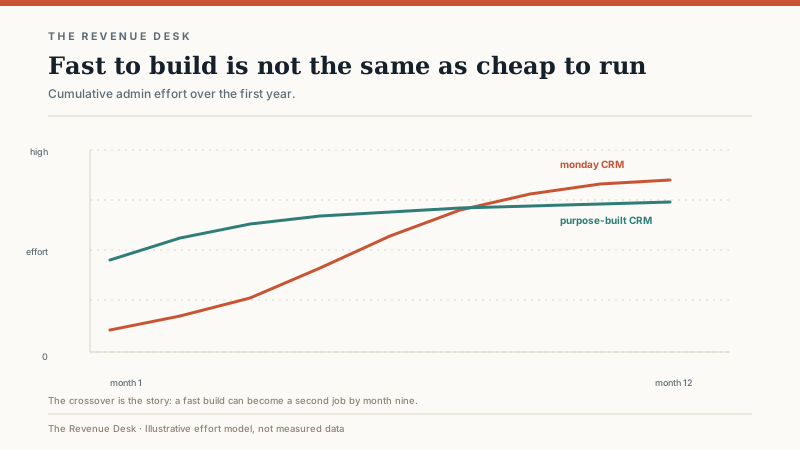
Monday CRM is priced per seat, with tiers that add automation, dashboards, and admin controls. The entry tiers are affordable for a small team. The higher tiers narrow the gap with purpose-built CRMs, especially once you add the cost of the person who maintains the boards and automations. That person is often the sales operations lead or the owner, which means the cost is hidden in hours rather than invoices.
The total cost of ownership has four parts: the subscription, the build time, the maintenance time, and the integrations. The subscription is easy to quote. The build time is a week or two for a simple pipeline. The maintenance time is the variable that surprises people. Every new board, automation, and dashboard needs an owner. Every integration can break. Every quarter, someone asks for a report that the board model does not support without a new connected board.
If you already use monday.com for project management, the marginal cost of adding CRM is lower because the team knows the interface and the integration is already there. If you are buying monday.com solely for CRM, compare the three-year cost with a purpose-built tool that includes the reporting and permissions you need out of the box.
Who it fits
Monday CRM fits small and mid-sized teams with a simple or moderately complex sales process, a visual culture, and a willingness to own the configuration. It fits agencies, consultancies, professional services firms, and project-based businesses where the line between a deal and a project is blurry. It fits teams that have tried a traditional CRM and found it too rigid, or teams that already run on monday.com and want one place to work.
It is a reasonable first CRM for a team of five to fifteen people. The price is low, the setup is fast, and the adoption curve is gentle. The mistake is assuming it will scale without a redesign. If you plan to double the sales team, add territories, and introduce a formal forecast, budget for a migration or a significant rebuild.
Who should avoid it
Avoid monday CRM if you have a complex enterprise sales process with multiple approvers, long cycles, and a compliance requirement. Avoid it if you need deep reporting across accounts, contacts, deals, and activities without building connected boards. Avoid it if you have a large contact database, a dedicated sales operations team, or a need for granular permissions. Avoid it if the person who would build and maintain the boards is already at capacity.
It is also a poor fit for a company that wants the CRM to enforce a process. Monday is flexible by design. If your team needs guardrails, a more opinionated CRM may be the better choice. Flexibility is a feature for a team that knows what it wants and a liability for a team that is still deciding.
What I would test in a demo
Import 5,000 records and see how the board performs. Build the forecast report your CEO will ask for, not the pipeline view the vendor shows. Test permissions with a contractor account. Test the mobile app with a weak signal. Check the automation limits and what happens when you hit them. Ask how duplicates are handled when a form, an import, and an email sync all create the same contact. Ask for a full data export that includes the board structure, not just the records.
Then ask the maintenance question: if the person who builds this leaves, who can take over? A CRM that only one person understands is a risk, regardless of how fast it was to build. Document the board structure, the automations, and the naming conventions from day one. It feels bureaucratic for a five-person team. It is cheaper than rebuilding from memory.
Implementation advice
Start with one pipeline and one team. Use the CRM template rather than building from a blank board. Name the stages after the buyer’s actions, not your internal process. Limit the columns to the ten that matter. Build three reports, not thirty. Set a rule for creating new boards and new columns so the workspace does not sprawl. Review the automations every quarter and delete the ones nobody uses.
The first month should be about adoption, not customization. Watch where reps get stuck. Fix the three biggest friction points. Then leave the system alone for 30 days and see what breaks. The things that break are the things you need to document.
If you are comparing monday CRM with a more structured platform, the best CRM software shortlist by sales motion puts it in context. If you are considering HubSpot instead, the HubSpot CRM review covers the free tier and the upgrade walls. And if you are still deciding whether you need a CRM at all, read how to choose one when the team has a number to hit.
Monday CRM is a good tool for the right team. It is not a smaller Salesforce, and it is not a worse HubSpot. It is a flexible board system with a CRM layer on top. If that is what you need, it is fast and affordable. If you need a system that enforces structure, keep looking.
