The Salesforce renewal arrived with 19 more seats than the original contract, a higher per-seat rate, and two add-ons nobody in the room remembered buying. Nothing illegal happened. The contract allowed all of it. That is the part nobody warns you about: Salesforce pricing is less a number than a structure, and the structure has more rooms than the tour shows.
I have bought Salesforce twice since then, inherited it once, and walked away from a fourth deal after the total cost of ownership crossed a line the business could not justify. This is the walkthrough I wish someone had given me before the first demo.
What Salesforce CRM actually is
Salesforce is a platform, not a single product. The core sales application is Sales Cloud, which holds accounts, contacts, opportunities, activities, and forecasts. Around it sits a catalog of clouds and add-ons: Service Cloud, Marketing Cloud, Commerce Cloud, Data Cloud, CPQ, Shield, MuleSoft, and a long tail of industry-specific products. The platform underneath lets you build custom objects, flows, approval processes, and applications that have nothing to do with sales.
That flexibility is the selling point and the trap. A company with a complex sales motion can model it in Salesforce more completely than in almost any other CRM. A company with a simple sales motion can spend two years and a six-figure implementation budget discovering that it only needed a pipeline and a follow-up reminder.
The edition ladder
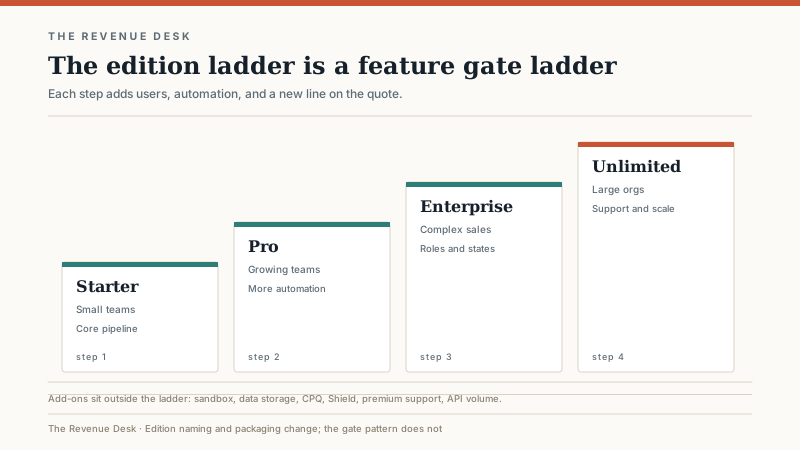
Salesforce has renamed its editions more than once. The current sales lineup is Starter Suite, Pro Suite, Enterprise, and Unlimited. Older contracts and job postings still use the legacy names Essentials, Professional, Enterprise, and Unlimited. If someone quotes you a price for “Professional,” ask which generation of packaging they mean, because the feature set and the price may not match the label in your head.
The ladder works like most enterprise software ladders. The entry edition gives you the core objects, basic reporting, and enough seats to get started. The next step adds automation, multiple pipelines, and more reporting. Enterprise adds the controls larger companies need: roles, profiles, permission sets, approval processes, territory management, a sandbox, and a higher API allowance. Unlimited adds premium support, a full sandbox, and more scale.
The jump that surprises buyers is not the first one. It is the jump from Pro to Enterprise, because that is where the governance features live. A 30-person team with one sales process can often stay on Pro. A 30-person team with two divisions, different commission plans, and a compliance requirement usually cannot.
Where the budget leaks
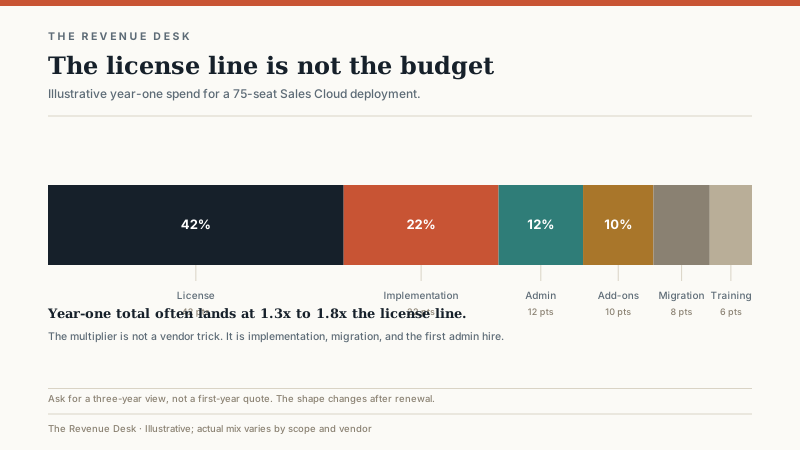
Salesforce list price is only the beginning. The leaks I see most often fall into six buckets.
Add-ons. Sandboxes beyond the included allowance, additional data storage, API call overages, Data Cloud, CPQ, Shield, Premier Support, and industry products all carry separate line items. Some are necessary. Many are sold because the account executive has a quota that includes them. Ask what happens if you do not buy the add-on for the first 12 months. If the answer is “you can add it later at the same price,” wait.
Implementation. A mid-market Salesforce implementation commonly runs 0.5x to 1.5x the annual license in year one, and complex enterprise programs can exceed that. The range is wide because “implementation” can mean anything from a two-week configuration to an 18-month program with a systems integrator. Get the scope in writing, including how many rounds of revisions are included and what happens when you ask for a change after sign-off.
The admin. Someone has to own the org. For a 50-seat deployment, that is often a quarter to a half of a full-time employee, and it is rarely the person who signed the contract. If you do not have that person internally, you are buying a part-time consultant whether or not the contract says so.
Data migration and cleanup. Importing 40,000 contacts is not the hard part. Deciding which 8,000 are real, which duplicates to merge, and which fields to map is the hard part. Budget time for the business, not just the consultant.
Integrations. Your ERP, marketing automation, support desk, data warehouse, and billing system all want a connection. Each connection has a build cost, a maintenance cost, and a failure mode. A “simple” integration is rarely simple after the first API change.
Seat true-ups. Salesforce contracts usually include a seat count and a mechanism for adding seats mid-term. The price for an added seat is often higher than the original blended rate. If you expect to hire, negotiate a ramp schedule before you sign, not after the first recruiter starts.
What implementation actually looks like
A straightforward Sales Cloud deployment for a 50 to 100-person team usually takes 8 to 16 weeks, assuming the process is already defined and the data is not a disaster. The sequence is predictable: discovery, design, configuration, data migration, testing, training, launch, and a stabilization period. The schedule slips when discovery turns into a debate about how the business should sell, which it often does.
You have two implementation paths. A partner brings experience, templates, and a team that has done this before. A partner also brings a statement of work, a change-order process, and an incentive to expand the scope. An internal admin with Salesforce experience is cheaper on paper and harder to find. My bias: use a partner for the first implementation if you have no internal Salesforce experience, but keep the design decisions in-house. The partner should configure your process, not invent one for you.
Who Salesforce fits, and who it does not
Salesforce is a strong fit when the sales motion is complex, the data model needs to reflect a real business rather than a generic pipeline, and the company plans to integrate several systems. It is also the safer choice when you need a large ecosystem of consultants, administrators, and third-party applications. Hiring is easier when the platform is common.
It is a poor fit for a five-person team with one pipeline and no admin. The entry edition can work, but the moment you need a custom object, a second pipeline, or a permission model, the cost climbs faster than the team’s ability to absorb it. It is also a poor fit for a company that wants to change its sales process every quarter. Salesforce can support change, but every change has a configuration cost, and the bill arrives in admin hours.
What I would negotiate
Ask for a multi-year term only if the discount is real and the seat ramp is written into the contract. A three-year deal with no ramp is a bet that your headcount forecast is right, and it rarely is.
Push for a cap on renewal uplift. Salesforce contracts often include an escalation clause. A cap of 3 to 5 percent per year is worth more than a few points of first-year discount, especially if you plan to stay for five years.
Get the sandbox in writing. Ask how many sandboxes are included, what type they are, and whether a full sandbox is available at your edition. Without a sandbox, every change is a production change, and every production change is a risk.
Define the implementation scope in business terms, not just technical terms. “Configure opportunity stages and two dashboards” is testable. “Implement sales process” is not. Include acceptance criteria and a fixed number of revision rounds.
Ask about data export. You should be able to get your data out in a usable format without paying a professional services fee. If the answer is vague, that is a warning sign.
The lock-in question
Salesforce lock-in is real, but it is not mainly about the contract. It is about the custom objects, flows, integrations, reports, and habits that accumulate around the platform. A company that has built its quoting process, renewal logic, and customer hierarchy inside Salesforce is not going to migrate because a competitor is 20 percent cheaper. The migration cost is measured in months, not dollars.
That is not a reason to avoid Salesforce. It is a reason to be deliberate about what you customize. Every custom object is a commitment. Every flow is a small piece of software that someone has to maintain. The companies that regret Salesforce are usually the ones that treated configuration as free.
If you are inheriting an org rather than buying a new one, the first 90 days are a different job. I wrote a separate guide on taking over an inherited Salesforce org that covers the audit, the cleanup, and the governance cadence. If you are still deciding whether Salesforce is the right platform at all, start with the CRM shortlist by sales motion and come back when Salesforce is the leading candidate. And if you are wondering why the company’s stock price keeps showing up in your research, the ticker is a separate story from the product.
Salesforce is a good system for companies that need a system. It is an expensive system for companies that need a pipeline. The difference is not the size of the company. It is the number of genuinely different sales motions, the amount of integration, and the willingness to fund an admin. Answer those three questions honestly and the edition decision gets a lot easier.
