A 12-person marketing agency I worked with stayed on the HubSpot CRM free tier for nine months. It was a good run. Deals were logged, follow-ups happened, and the owner could see the pipeline without asking three people for an update. The free tier ended the week the owner wanted a second pipeline and a report that combined retainer revenue with new business. The upgrade quote was not outrageous, but it was five times what the team had been paying, which was nothing.
That is the HubSpot story in miniature. The free product is genuinely useful, which is rare. The paid product is genuinely good, which is also rare. The gap between them is where most of the disappointment lives.
What the free CRM actually includes
The HubSpot CRM free tier gives you contacts, companies, deals, tasks, and a pipeline. It includes email tracking, forms, meeting links, live chat, and a basic reporting layer. It syncs with Gmail and Outlook. It has a mobile app. For a small team that has never used a CRM, it is a real system, not a demo with a countdown timer.
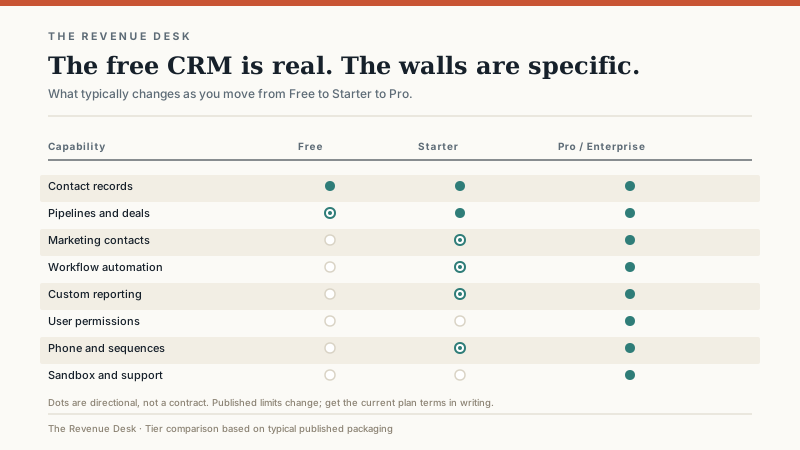
The limits are deliberate. You get a small number of pipelines, limited automation, limited custom reporting, and almost no granular permissions. The free tier is designed to prove the value of the product to a team that is small enough to work without governance. That is a reasonable business model. It is also a trap if you assume the free tier will scale with you.
Where the walls are
The first wall is usually pipelines. A company with one sales process can run on one pipeline. A company with new business, renewals, and partnerships needs three, and that is often a paid feature or a reason to restructure how you use the tool.
The second wall is automation. Free and entry tiers typically limit the number of automated actions, the complexity of workflows, or both. A follow-up sequence that sends three emails is fine. A workflow that routes leads by territory, creates a task for the owner, and updates a lifecycle stage based on activity is not.
The third wall is reporting. Basic dashboards are included. Custom reports that join deal properties, contact properties, and activity data often require a higher tier. This is the wall that hurts because it appears exactly when management starts asking better questions.
The fourth wall is permissions. Free tools usually treat every user as an admin. That is fine for five people who trust each other. It is not fine when you hire a junior rep, a contractor, or a sales development team that should not see every contact and every deal.
The fifth wall is marketing contacts. HubSpot’s pricing separates marketing contacts from non-marketing contacts. You can store a large database relatively cheaply, but the moment you want to send marketing email to a segment, those contacts may count toward a paid tier. This is the line item that surprises companies with a big list and a small sales team.
How HubSpot prices
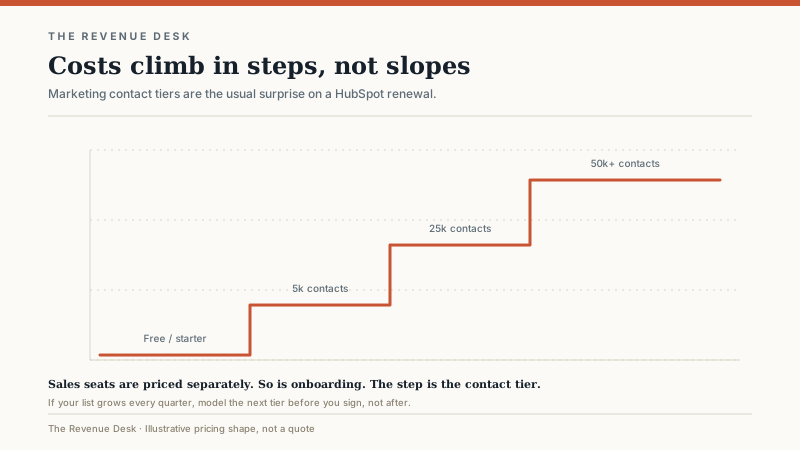
HubSpot sells hubs, not a single CRM SKU. Sales Hub, Marketing Hub, Service Hub, Content Hub, and Commerce Hub each have their own tiers, and the bundles combine them. Sales Hub is priced per seat. Marketing Hub is priced by contact tier and seats. The bundle discount is real, but so is the bundle creep: companies often buy a higher tier than they need because the bundle math makes the next tier look cheaper than adding one feature a la carte.
For a small team, the entry bundles often land in the low hundreds of dollars per month. Professional and Enterprise bundles can cross into four figures per month once seats, marketing contacts, and onboarding are included. The exact number matters less than the shape: the subscription grows in steps as contacts, seats, and hubs are added. It does not grow smoothly with usage.
What HubSpot does well
The user experience is the best in the category for a non-technical sales team. A rep can figure out the deal board without a training manual. The email integration is reliable. Forms, landing pages, meeting links, and live chat work together without an integration project. The reporting is readable by people who are not analysts. The mobile app is good enough to use in a parking lot before a meeting.
HubSpot is also strong when marketing and sales need to share one view of the customer. Lifecycle stages, lead scoring, campaign attribution, and deal reporting live in the same system, which removes a class of “which number is right?” arguments. For an inbound-led business, that alignment is worth more than any individual feature.
Where HubSpot strains
HubSpot is weaker when sales is outbound-heavy and the marketing team is small. The sequencing and calling tools are competent, but the center of gravity is inbound. A team that buys lists, cold-calls, and runs multi-touch outbound may find the workflow less natural than a tool built for that motion.
It also strains under complex sales processes. If you need CPQ, approval chains, territory management, custom objects with complex relationships, or a data model that looks like an ERP, HubSpot can do some of it, but the workarounds accumulate. The platform is more flexible than its reputation, and less flexible than Salesforce. The gap matters most at the enterprise end.
Companies with very large contact databases should model the marketing contact tiers carefully before they commit. The storage cost is not the issue. The cost of sending to a large list is. A 200,000-contact database that gets emailed twice a month is a different financial commitment than a 5,000-contact database that gets emailed twice a month, even if the CRM seat count is the same.
Who should walk away
Walk away if you are a three-person team with no marketing engine and no plan to build one. The free tier may still work, but the paid tiers are hard to justify when your entire pipeline fits in a spreadsheet and your customers come from referrals.
Walk away if you need deep customization, complex approvals, or a sales process that changes by division. You will spend more time building workarounds than selling. Walk away if you have a 500,000-contact database and a small sales team, because the contact-tier math will dominate the budget. And walk away if you are buying it only because a peer company uses it. Their sales motion is not yours.
Implementation and governance
HubSpot is fast to set up and slow to keep clean. The speed is real: a team can be running deals in a week. The cleanliness problem comes from flexibility. It is easy to create a new property, a new pipeline, a new lifecycle stage, and a new report for every manager who asks. Six months later, you have 140 properties and nobody remembers which ones are authoritative.
My advice is to treat the first 30 days as a design project, not a configuration race. Define the lifecycle stages, the deal stages, the five properties that must be filled, and the three reports leadership will actually use. Then freeze the schema for 60 days. Additions should require a reason and an owner, not just a request.
Data hygiene is the other ongoing job. HubSpot’s deduplication tools help, but they do not replace a rule about how contacts are created. Decide whether forms, imports, and integrations can create new contacts automatically, and who owns the merge queue. A CRM with 30,000 contacts and 8,000 duplicates is not a customer view. It is a filing cabinet with a search problem.
What I would test in a demo
Bring a real deal with real contacts and run it through the pipeline. Ask the vendor to show you the report your CEO will ask for on the first Monday after launch. Test the mobile app. Test the permission model with a contractor account. Ask what happens when you exceed the contact tier mid-month, and whether the overage is prorated or billed at the next tier. Ask for the data export format and confirm you can take your contacts, deals, and activity history with you.
Then ask the question that matters: what does the total look like in year two, after one seat increase and one contact-tier increase? If the answer is a range, ask for the exact renewal formula. The first-year quote is a sales document. The renewal is the real price.
HubSpot is a strong choice for the right team. It is a frustrating choice for a team that buys the demo instead of the fit. If you are still deciding between free and paid, read where free CRM stops working. If you are comparing it with other platforms, start with the shortlist by sales motion. And if you are still defining the process the CRM is supposed to support, read what customer relationship management can and cannot fix first.
The free tier is a good place to learn what you need. It is a bad place to build a permanent process. The teams that get HubSpot right are the ones that move to a paid tier for a specific reason, not the ones that upgrade because the free tier made them nervous.
