The last CRM selection I sat in on started with a list of 14 vendors and ended with two. The company had 22 sales reps, two motions that looked nothing alike, and a CEO who wanted “the best CRM software” by the end of the month. We spent the first week arguing about the list. We should have spent it arguing about the sales motion.
That is the problem with the phrase. “Best CRM software” sounds like a product question. It is a fit question. The best software for a high-volume inside sales team is usually a bad choice for a field sales organization, and the best software for a dealership is usually a bad choice for a B2B software company. The features overlap. The work does not.
Start with the sales motion
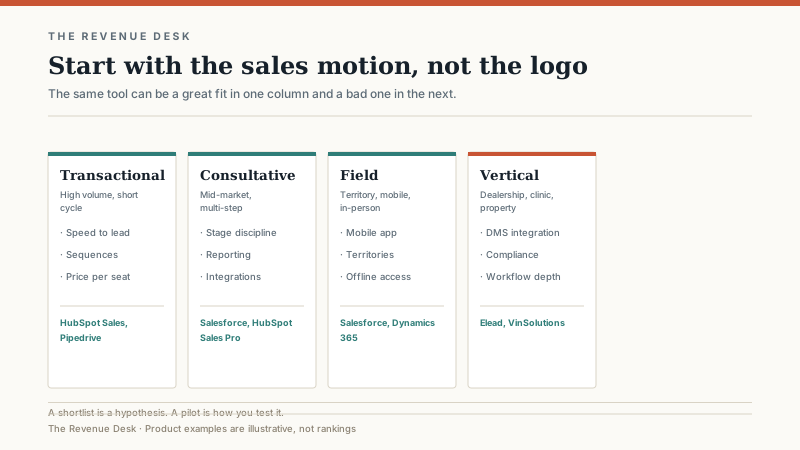
I use four broad motions, plus vertical as a fifth category. Most companies are a blend, but one usually dominates. The dominant motion should drive the shortlist.
Transactional. High volume, short cycle, often inside sales. The team lives in sequences, call lists, and a simple pipeline. Speed to lead matters more than a complex data model. Reporting is about activity and conversion, not forecast accuracy across a six-month committee sale.
Consultative. Mid-market, multi-step, several stakeholders. The team needs stage discipline, meeting notes, document tracking, and a forecast that reflects reality. Integrations with marketing, support, and finance matter. The data model needs enough structure to support a buying committee without becoming a second product.
Field. Territory-based, mobile, in-person. The team needs a mobile app that works when the signal does not, territory and account planning, visit logging, and a manager who can see coverage without calling anyone. Offline access and map-based planning are not nice-to-haves.
Enterprise. Long cycles, complex approvals, multiple business units, procurement, legal, and security review. The team needs custom objects, role hierarchies, audit trails, sandbox environments, and an ecosystem of implementation partners. The software is a platform decision as much as a sales decision.
Vertical. Dealerships, clinics, property management, construction. The workflow is specific enough that a general CRM becomes a customization project. The shortlist should include tools built for the vertical, even if they are less famous.
The shortlist, by motion
These are not rankings. They are starting points based on the work, not the review sites.
Transactional: HubSpot Sales Hub and Pipedrive are the usual first calls. HubSpot is stronger when marketing and sales share a lifecycle; Pipedrive is simpler and often cheaper for a pure pipeline team. Zoho CRM is a value option if you are willing to trade polish for price. All three can run a high-volume inside sales team without a dedicated admin, which is the test that matters.
Consultative: Salesforce Sales Cloud and HubSpot Sales Hub Professional are the two most common answers, with monday CRM as the flexible, lower-cost alternative. Salesforce wins on customization and ecosystem. HubSpot wins on time to productivity and marketing alignment. monday wins on visual pipeline design and price, but asks you to accept lighter reporting and more workarounds as the process gets complex.
Field: Salesforce and Microsoft Dynamics 365 Sales are the default shortlist, mainly because of their mobile, territory, and integration capabilities. Zoho CRM is a credible lower-cost option for smaller field teams. The demo should include a phone with a bad signal and a rep who has not synced in three days.
Enterprise: Salesforce, Dynamics 365, and SAP Sales Cloud. The decision usually comes down to the ERP and the existing Microsoft or SAP footprint. At this level, the implementation partner matters as much as the software. A great partner with an average platform will beat a poor partner with a great platform.
Vertical: Elead, VinSolutions, DealerSocket, and similar dealership CRMs for auto retail. The general CRMs can be customized into a dealership workflow, but the DMS integration, desking, trade appraisal, and F&I pieces are where the real work lives. If you are in auto retail, read the Eleads CRM breakdown before you decide to customize a general tool.
The six criteria I score
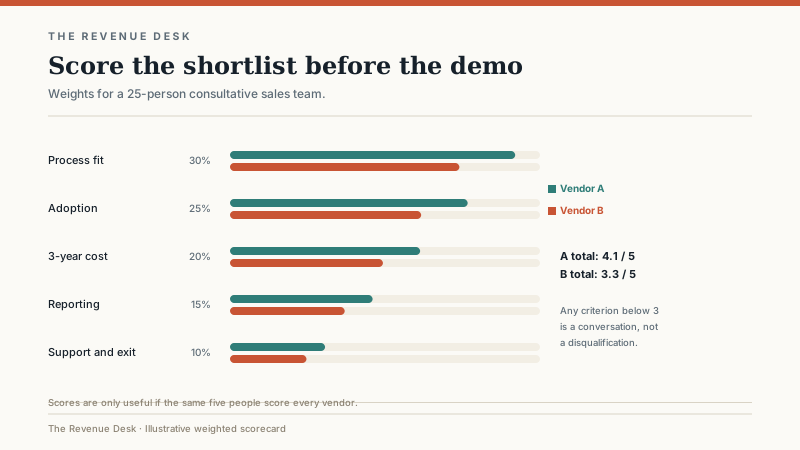
Every shortlist gets the same six questions, weighted by the business. The weights change; the questions do not.
Process fit. Can the software model your stages, approvals, and handoffs without a custom object for every exception? If the demo requires a workaround for your core process, the workaround becomes a permanent part of your operation.
Time to first productive use. How long until a rep can run a real deal without a consultant in the room? A two-week setup is not automatically better than a twelve-week implementation, but a long implementation has a real cost in lost selling time and organizational patience.
Admin burden. Who maintains the fields, reports, integrations, and permissions? A system that requires a full-time admin is not necessarily disqualified, but the admin salary belongs in the total cost. A system that requires no admin usually means someone else is doing the work in spreadsheets.
Reporting. Can the system answer the five questions leadership asks every Monday without a data warehouse? If every meaningful report requires an export, you have bought a database with a nicer login screen.
Three-year total cost. License, implementation, admin, add-ons, integrations, training, and renewal uplift. The first-year quote is not the cost. The three-year view is the cost.
Exit path. Can you export your data in a usable format? Are there termination fees? Does the contract auto-renew? A CRM you cannot leave is a CRM that can raise your price at renewal. The exit path is part of the product, even if it is not on the demo script.
A note on review sites and “best of” lists
Most “best CRM software” lists are influenced by affiliate commissions, sponsorship, or a scoring rubric that rewards the vendor with the most features rather than the best fit. That does not make them useless. It makes them a starting point, not a decision. The companies that get burned are the ones that pick the top three from a list and skip the part where they test the software against their own deals.
I have no affiliate relationship with any vendor mentioned here. The recommendations come from buying, implementing, and inheriting these systems, and from watching teams succeed or fail with them. Your mileage will vary with your process, your data, and your admin.
How to run a 30-day evaluation
Pick three vendors, not ten. Ask each one to configure a sandbox with your stages, your five most important reports, and 20 real deals. Give the same five users access to all three. Run the deals for two weeks, then switch. At the end, score the six criteria above and compare the weighted totals.
The demo should include the ugly parts: a duplicate record, a deal with a missing close date, a rep who wants to work from a phone, a manager who wants a forecast by territory. A vendor that can handle the ugly parts in a sandbox is more trustworthy than one that can only handle the polished demo.
At the end of the month, you should have a shortlist of two and a clear reason to choose one. If you have three finalists and no clear reason, you have not evaluated. You have collected demos.
Pricing, in rough terms
Small and mid-market CRMs typically run from about $15 to $150 per user per month, depending on edition, billing term, and add-ons. Enterprise platforms can run several hundred dollars per user per month before implementation. Implementation ranges from a few thousand dollars for a simple configuration to six figures for a complex enterprise program. Admin costs are usually the largest hidden line: a quarter to a full-time employee, depending on size and complexity.
These ranges are deliberately broad because the same product can be cheap or expensive depending on how you buy it. A 20-person team on an annual contract with a modest edition may pay less than a 10-person team on a monthly contract with three add-ons. Negotiate the term, the seat ramp, and the renewal cap, not just the first-year discount.
Common mistakes
Buying for the demo instead of the process. Customizing before the team agrees on stages. Choosing the tool your investor uses. Skipping the data cleanup because the vendor said migration was included. Signing an annual contract before a pilot. Letting the loudest salesperson choose the software. Forgetting that the admin has to be hired, trained, and retained.
The most expensive mistake is treating the CRM as an IT purchase. It is a sales operations purchase. The sales leader should own the outcome, the admin should own the system, and the CEO should own the definition of a qualified deal. If those three people are not in the room, the software decision is being made by the wrong people.
If you want the decision framework rather than the shortlist, read how to choose a CRM when the team has a number to hit. If you are leaning toward a specific platform, the Salesforce and HubSpot breakdowns cover the cost structures in more detail. The best CRM software is the one your team will use after the consultants leave. Everything else is a feature comparison.
