On day two of inheriting a Salesforce org, I deleted a field. It looked unused. It had no records, no reports, and a name that suggested someone’s abandoned experiment. By lunch, three flows were broken and a dashboard that the COO looked at every Monday was blank. The field was the key that joined two objects together. Nobody had documented it because the person who built it had left eight months earlier.
That is the defining experience of an inherited Salesforce org. The platform is capable of almost anything, which means the org you inherit is a record of every decision, shortcut, and abandoned project that came before you. Some of it is load-bearing. Some of it is debris. The hard part is telling the difference before you touch anything.
What SFDC actually means
SFDC is shorthand for Salesforce.com, the company’s original domain and the name many practitioners still use. It is not a separate product, a different edition, or an old ticker. You will see it in job postings (“SFDC Administrator”), integration names, internal Slack channels, and conference badges. When someone says “the SFDC org,” they mean the Salesforce environment. When someone says “SFDC CRM,” they usually mean Salesforce CRM with the old abbreviation attached.
That matters because the abbreviation carries a certain culture. The people who say SFDC are often the people who have been in the ecosystem long enough to remember when the platform was primarily a sales force automation tool. They are also the people who are most likely to have strong opinions about custom objects. Listen to them, but verify what you hear. An inherited org is full of folklore.
Why an inherited org is different
A new implementation starts with a design. An inherited org starts with an archaeology project. The previous team may have built custom objects for processes that no longer exist, created profiles for roles that have been reorganized, or connected an integration that nobody owns. The org is not necessarily broken. It is just full of decisions that made sense to someone else at a different time.
The risk is not that the platform will fail. Salesforce is stable. The risk is that you will make a change without understanding the dependencies, or that you will spend six months cleaning up things that do not matter while the sales team works around the things that do. The job is to find the load-bearing walls before you remodel.
The first 14 days
Freeze risky changes. That does not mean freeze all work. It means no one deletes fields, changes sharing rules, or deploys a flow without a review. Put the freeze in writing and give it an end date. A freeze without an end date becomes a backlog, and a backlog without a process becomes a shadow IT problem.
Get a sandbox. If you do not have one, ask for one before you do anything else. A full sandbox is better, but a developer sandbox is enough to inspect metadata and test changes. If the contract does not include a sandbox, that is a renewal conversation, not a reason to work directly in production.
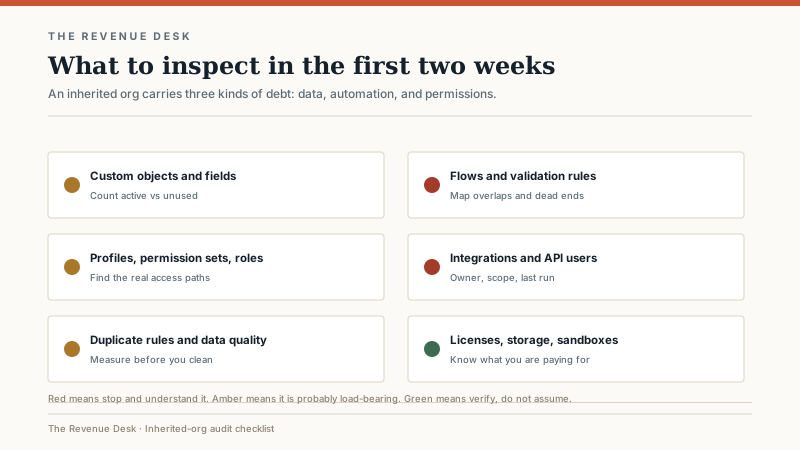
Inventory the org. I use six categories: custom objects and fields, active flows and validation rules, profiles and permission sets, integrations and API users, duplicate rules and data quality, and licenses, storage, and sandboxes. For each category, write down what exists, who owns it, and what breaks if it disappears. The goal is not a perfect diagram. The goal is a list of things you should not touch until you understand them.
What to look for in the audit
Custom objects and fields. Count them. Then count how many are actually used in reports, flows, or page layouts. In the orgs I have audited, a third to half of custom fields are unused or duplicate another field. Do not delete them yet. Tag them, report on them, and set a review date.
Flows and validation rules. Salesforce has accumulated automation tools over the years: workflow rules, Process Builder, and Flow. An org that has been around for a decade often has all three doing overlapping work. Map the triggers, the order of execution, and the failure paths. A flow that fails silently is worse than no automation at all.
Profiles, permission sets, and roles. Count the profiles. If there are more than a handful, someone has been cloning instead of designing. Look for users with modify-all-data permissions, integrations running as admins, and permission sets that grant access nobody can explain. The goal is least privilege, but the first goal is knowing who can see what.
Integrations and API users. List every integration, its owner, its scope, and the last time it ran successfully. Look for hard-coded credentials, integrations using a named admin account, and API users that no human monitors. An integration that fails quietly can corrupt data for weeks before anyone notices.
Duplicate rules and data quality. Measure before you clean. Count duplicate accounts, duplicate contacts, records with no owner, and records with missing key fields. A cleanup project without a measurement baseline is just a feeling.
Licenses, storage, and sandboxes. Pull the license usage report. Find users who have not logged in for 90 days, users with the wrong license type, and seats you are paying for but not using. Check storage against the limit. Check sandbox refresh dates. These are the easiest savings in the org, and they fund the cleanup work.
The 30/60/90 plan
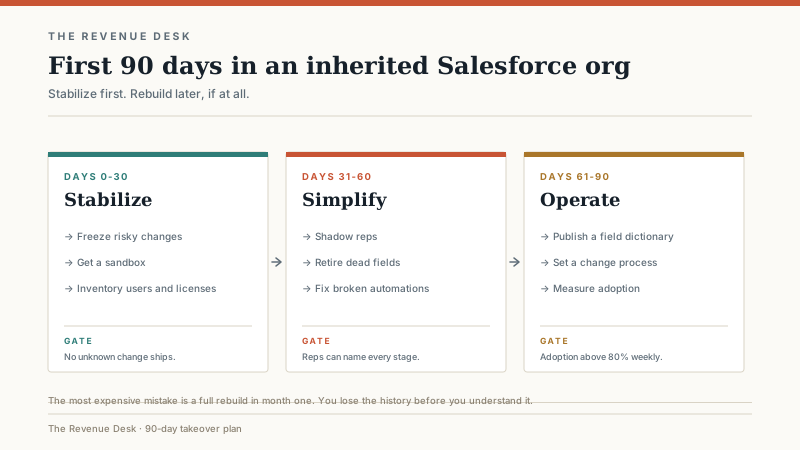
Days 0 to 30: stabilize. Freeze risky changes, get a sandbox, inventory the org, and meet the stakeholders. Do not rebuild anything. Do not delete anything. The output is a written map of what exists and a short list of risks.
Days 31 to 60: simplify. Shadow the reps. Watch how they actually use the system, not how the documentation says they should. Retire the dead fields and automations you have confirmed are unused. Fix the broken flows that are causing the most support tickets. Consolidate duplicate fields where the mapping is obvious. Publish a field dictionary, even if it is a spreadsheet. The output is a smaller, more understandable org.
Days 61 to 90: operate. Establish a change process. One intake form, one prioritization cadence, one release window. Define who can request what and who approves it. Train the team on the changes you made. Measure adoption before and after. The output is a system that can absorb change without another archaeological dig.
Technical debt you will probably find
A dozen validation rules on one object, each added to fix a specific deal, now conflicting with each other. Forty profiles because every new hire got a clone. A Process Builder and a Flow that both update the same field, with no clear order of execution. A formula field with a hard-coded record ID that breaks when the record is recreated. An integration running as an admin user with a password that has not changed since 2019. A sandbox that has not been refreshed in two years, so testing is a fiction. Storage at 92 percent because nobody archived old emails.
None of these are exotic. They are the normal residue of a system that has been used by real people for a long time. The fix is not a rebuild. The fix is a sequence: measure, prioritize by business impact, fix the riskiest thing first, and document the change so the next person does not repeat the archaeology.
The license audit
Salesforce licenses are expensive, and orgs accumulate unused seats. Pull the login report and the license assignment report. Compare them. Look for users who left the company but still have a license, users who have a full Salesforce license but only need a platform license, and integrations consuming a license they do not need. Do this before renewal, not after. The savings often pay for the admin you need.
Be careful with the downgrade. A user who only needs to read reports may still need access to a custom object or a specific app. Test the change in a sandbox with a real user before you move 20 people to a cheaper license. The cost of a bad downgrade is a support ticket queue and a loss of trust.
Governance that prevents the next mess
One owner. A named person who is accountable for the org, even if the work is shared. A change request form that asks three questions: What business problem does this solve? What happens if we do not do it? How will we measure success? A weekly or biweekly prioritization meeting with sales, marketing, and support. A release calendar. A field dictionary. A change log that a new admin can read.
None of this is glamorous. It is the difference between an org that improves and an org that accumulates. The companies that get the most from Salesforce are not the ones with the most custom objects. They are the ones with the fewest unnecessary ones, and a process for deciding what to add next.
If you are still buying Salesforce rather than inheriting it, the edition and cost walkthrough will save you from a few of these problems before they start. If you are wondering why the company’s ticker keeps appearing in your research, read what NYSE: CRM does and does not tell a buyer. And if the org is a mess because the sales process is a mess, start with the process before the platform. Salesforce will faithfully automate whatever you tell it to do. That is the problem and the point.
