The first CRM rollout I ran ended with a spreadsheet. Not because the software failed. The sales team had 28 outside reps, about $9 million in open pipeline, and two definitions of a qualified lead. The CRM captured both definitions faithfully. The forecast never had a chance.
That was 2014. I have since watched the same story play out at a specialty manufacturer, a commercial lighting distributor, and a software company that should have known better. The pattern is always the same: a company buys customer relationship management software to fix a visibility problem, then discovers the real problem was an agreement problem. Nobody had decided what a deal was, who owned the next step, or when a lead stopped being a lead.
Customer relationship management is not a contact database with a pipeline view. It is the operating system for the commitments a sales team makes. That distinction sounds academic until you are the person staring at a forecast that says $4.2 million and a bank account that says otherwise.
What customer relationship management actually means
Strip away the vendor language and a CRM does three jobs. It remembers, it reminds, and it reports.
It remembers every call, email, quote, meeting note, and promise, attached to a company and a person. When a rep leaves, the history stays. When a customer calls and says “we talked about this in March,” someone can find the thread instead of guessing. That alone is worth the license for a team with any turnover.
It reminds people to follow up. A deal that has gone quiet for 18 days surfaces on a list. A renewal appears 90 days before it lapses. A lead that came in from a trade show gets a task, not a sticky note. The reminder is not glamorous, but it is where most of the return comes from.
It reports. Not a wall of charts, but answers to specific questions: Which forecasted deals have not had a conversation in three weeks? Which rep has the longest stage-two dwell time? Which lead source produces customers instead of just leads? If the system cannot answer one of those questions in two clicks, it is a logging tool, not a management tool.
Everything else, the AI summaries, the conversation intelligence, the twelve-tab contact record, is optional. Useful when it works. Never the reason the project succeeds or fails.
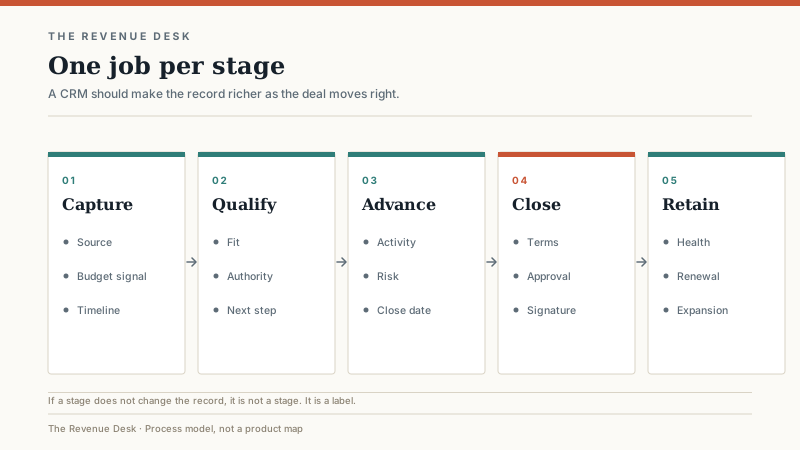
The three jobs, in practice
Remembering is a data-entry problem, which is why it fails. Reps will not fill out 14 fields after a call. They will fill out three if the fields map to something they need later. The test I use: would a rep open this record before the next call even if a manager never looked at it? If yes, the data has value to the person doing the work. If no, you are building a reporting system on top of a data-entry tax.
Reminding is a process design problem. Most CRMs can automate a task. The hard part is deciding which follow-up matters and how often. A sequence that fires five emails in eight days is not a strategy. A task that says “call the buying committee after the demo” is closer. The reminder should encode a judgment someone already made, not replace it.
Reporting is a definition problem. Every pipeline report is only as good as the stage definitions and the close dates underneath it. If two reps use “proposal sent” to mean different things, the report is fiction with a nice font. This is why the first useful CRM project is usually a vocabulary project wearing a software budget.
What a CRM will not fix
A CRM will not fix a weak sales manager. It will give that manager better data about a team they are not coaching. It will not fix a comp plan that pays for new logos and then wonders why nobody renews accounts. It will not fix a product that customers do not want, a price that is out of the market, or a sales process that exists only in the founder’s head.
It will also not fix data hygiene on its own. Duplicate records, half-filled accounts, and contacts with no owner are not software defects. They are the accumulated result of nobody owning the definition of a complete record. A CRM can enforce required fields, but it cannot make people care about them.
The most common mistake I see is buying a CRM to solve an accountability problem. If nobody owns the number today, nobody will own the dashboard tomorrow. The dashboard will just make the absence of ownership more visible, which is useful, but only if someone is prepared to act on it.
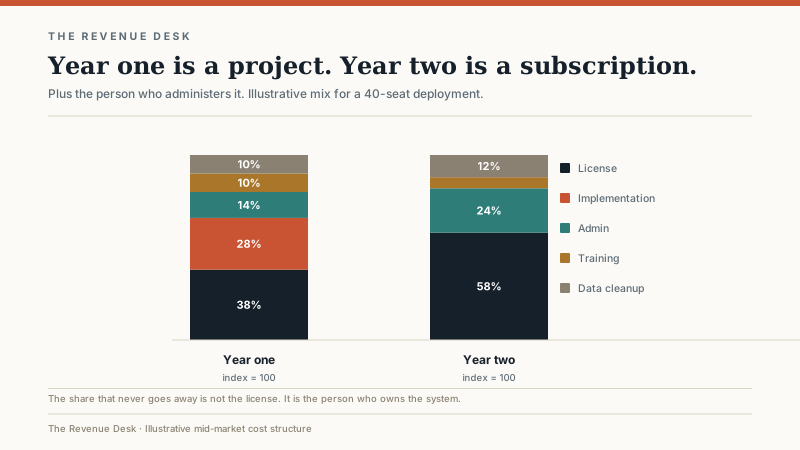
What it costs after year one
Software pricing is the easy part to quote and the hardest part to compare. Small and mid-market CRMs usually run somewhere between $15 and $150 per user per month, depending on edition and contract length. Enterprise platforms can go well above that. Implementation is often 0.5x to 1.5x the annual license for a mid-market deployment, and the first year usually includes data migration, integration work, and training that nobody put in the original budget.
Then there is the line item that surprises people: the admin. Someone has to own fields, permissions, reports, integrations, and the steady stream of requests that starts the week after launch. For a 40-person sales team, that is often a quarter to a half of a full-time job, sometimes more in the first six months. If you do not have that person, the system will slowly drift into a very expensive spreadsheet with a login screen.
Five signs you need one now
You probably need a CRM if deals live in individual inboxes and nobody can answer “what is in the pipeline?” without calling a meeting. You need one if a rep leaves and the account history leaves with them. You need one if follow-up depends on someone remembering. You need one if the forecast is a spreadsheet that three people update by hand. And you need one if you cannot answer how many touches it takes to close a deal, or which source produced the last ten customers.
You probably do not need one if you have two reps, one product, a short cycle, and no repeat business. A shared inbox and a disciplined weekly pipeline meeting will outperform a CRM you do not have time to configure. Revisit the decision at five reps or when the first renewal cycle starts, whichever comes first.
A rollout sequence that works
Name one internal owner. Not a committee. One person with the authority to say no to customization requests and the patience to sit with reps while they use the thing.
Define four to six stages, then stop. Each stage needs an exit criterion a rep can explain without looking at a slide. “Discovery complete” is not a criterion. “Budget confirmed, decision maker identified, next meeting on the calendar” is. The CRM should enforce the second version.
Pick one team and one pipeline for the first rollout. Clean 50 accounts by hand before importing anything. Configure the ten fields the team will actually use, plus the five the business cannot live without. Resist the urge to build for every edge case in month one. You can add complexity later; you cannot easily remove it.
Run a six-week pilot with weekly check-ins. Train in 30-minute sessions tied to a rep’s actual day, not a two-hour overview of every tab. Watch where people stop using the system and ask why. The answer is usually a missing field, a confusing stage, or a report that does not match the manager’s mental model.
After 90 days, review adoption before you review features. If reps are logging activity without being chased, the foundation is working. If they are not, more features will not help.
The metrics that tell you it is working
I look at five numbers in the first quarter. Logged activity per rep per week, because an empty record is a leading indicator of a lost deal. Follow-up completion rate, because the reminder is the cheapest part of the system. Stage age, because a deal that has sat in the same stage for twice the median is either stuck or dead. Forecast accuracy, measured against closed-won at the end of the quarter. And record completeness on the ten fields that matter, not all fields.
None of these require a data scientist. They require a manager who looks at the same five numbers every Monday and asks questions about the outliers. The CRM supplies the numbers. The manager supplies the consequence.
Who should wait
If your sales cycle is under two weeks, your average deal is under a few thousand dollars, and you have never lost a deal because someone forgot to follow up, a CRM may be overkill. A shared inbox, a simple deal sheet, and a weekly review can carry you further than a half-configured platform. The same is true if you are pre-revenue and still looking for product-market fit. A CRM will not tell you what customers want. It will only record how confidently you guessed.
Customer relationship management is not complicated. It is disciplined. The software is the easy part. The agreement about what a deal is, who owns the next step, and what the team will stop doing instead is the work. Get that right and almost any reputable CRM will do. Get it wrong and the best platform on the market will become a very expensive way to document confusion.
If you are already comparing platforms, start with how to choose a CRM when the team has a number to hit, then narrow the field with the best CRM software shortlist by sales motion. If you are still small enough to consider a free tier, read where free CRM stops working before you import a single contact.
